Modifies how a list choice is selected by value. See "Choose by" below.
Determines method of selecting between list choices.
Value Output Index Output 0 (Zero) 0 (Zero) 1 (One) 1 (One) 6 (???)* 10 (Ten) 8 (???)** 50 (Fifty) 9 (???)*** 100 (One Hundred) 10 (Ten) 100 (One Hundred) * returns 5 (Five) if 'Check For Valid Choice' is true. ** returns 10 (Ten) if 'Check For Valid Choice' is true. *** returns 10 (Ten) if 'Check For Valid Choice' is true.
Used in the GuiText2GuiText module, this is a comma-seperated list of text/text pairs. See "Interpret Direction" below.
To enter your own custom conversions, it is done in a text/text pair system, with each choice seperated by a comma. If a word is not given for a particular choice, then it will be converted to nothing.
Both of these fields are limited to the first 1000 characters. They are both added to the internal conversion list.
An example: You have a module that outputs an integer representing some possible note length values, and you want the user to be able to see the choice in a text box. Enter '1=Whole Note,2=Half Note,4=Quarter Note,8=Eighth Note,16=Sixteenth Note' into the 'Conversions 1' field. Use an int to text module to convert the integer into text that this module can then convert. Words entered that have no corresponding value (eg, '7' in this case) will pass through unchanged. To convert these words back into the numeric representations, use the 'A<->B' option of 'Interpret Direction'.
Used in the GuiText2GuiText module, this selects how words are translated. Word pairs are entered in a A=B,A=B,... pattern.
Used in Text to Bool/Int/List modules, this allows text proper to be converted to values, instead of just numbers entered into a text field. Tests are case insensitive.
1: Attempts to find the name of a choice on a list, if this outputs list choices.
2: Converts text to values listed in the 'Other Conversions' field. See "Other Conversions" below.3: Converts some typical text to values, depending on the type of output:
If output type is Boolean, then 'true', 'on', and 'yes' output TRUE.
If output type is List, then 'first' .. 'twentieth' output that particular choice from the list, irrespective of the 'Choose by' setting.
If output type is Integer or List, then 'one' .. 'twenty' output the corresponding integers.
4: Converts numbers in the text to a number to use as the output, stopping when the first character that cannot be interpreted is found. If the output is boolean, any non-zero number will output TRUE.
5: If none of the above are able to determine a value, then 0 or FALSE is output, dependant on the output type.
Inverts the boolean output. See "Output FALSE if" below.
Used only on modules with a List pin on the left side. This determines the list that is sent to the List pin connected to this module. This can be used to create your own custom lists.
To enter your own custom list, it is done in a name/value pair system, with each choice seperated by a comma. The types of values and their limits depends on the specific module:
Lists are limited to the first 1000 characters in this field.
The List setting for the example list given in the description of "Choose by" above would be 'Zero=0,One,Two,Three,Four,Five,Ten=10,Twenty=20,Fifty=50,One Hundred=100'
Used for text to int or list modules, this is an optional comma-seperated list of text/value pairs. This is only checked if 'Interpret Text' is set to TRUE. See "Interpret Text" above.
To enter your own custom values, it is done in a text/value pair system, with each choice seperated by a comma. The types of values and their limits depends on the specific module:
This field limited to the first 1000 characters.
An example: you want to output the number of notes in a measure, and you want the user to be able to enter some common note names, then enter 'Whole=1,Half,Quarter=4,Eighth=8,Sixteenth=16' into the 'Other Conversions' field.
Used for text to bool modules, this is an optional comma-seperated list of other words you would like to output a TRUE value if entered. For example, to make the module a s'koshe bit multilingual, you could put 'Vero,Sann,Vrai,Wahr,Jippi' into the field. This is only checked if 'Interpret Text' is set to TRUE. See "Interpret Text" above.
Selects the method used to determine whether a boolean output should be TRUE or FALSE.
Used only in GUI to GUI modules, this determines the direction data will travel.
Used only in GuiList2GuiText and GuiText2GuiList, this returns the actual name of the choice rather than either it's value or index.
Determines the method used to convert decimal numbers to integers.
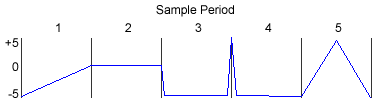
Determines the method used to sample the data.
Determines how often to update the output. The rate is given in hertz (times/second), with 40 Hz as the default.
The amount is capped to 0.0001 Hz (1x/2hrs 46min 40sec) to 500.0 Hz, inclusive.
Determines the threshold to test against for boolean outputs. The default value is 0. See "Output FALSE if" above.
Selects what the output should be if the boolean input is FALSE. The default value is 0, "False", or the first choice on a list, dependant on the type of output.
Selects what the output should be if the boolean input is TRUE. The default value is 10, "True", or the last choice on a list, dependant on the type of output.